Recently I am trying to make 0xdroid use YUV Overlay in OMAP3 on beagleboard to play video. The purpose is utilizing the overlay in DSS system to accelerate by getting rid of the effort of the composition of different layers on software side and colorspace conversion to RGB.
For achieving this, we should get a libopencorehw module for opencore in Android. The implementation of libopencorehw can use the video-out driver, a V4l2 provider to interface DSS, like in TI's omapzoom tree. Unfortunately this way stuck me for a while, either there has problem in video-out driver or in TI's liboverlay.
After figuring out for a while, we met up another way for this, making libopencorehw use DSS ioctl directly. So we rewrite libopencorehw as simple as it looks and here is the new libopencorehw in 0xdroid. This way is more lightweight and easier to me. Welcome to try.
2009年9月3日 星期四


2009年6月10日 星期三
藍芽Speaker,請不要斷續
前一陣子,因為demo需要,和 Jserv去光華商場買了一件藍芽Speaker回來,也開始玩了Bluetooth的a2dp。但運氣不好的是,沒有把bluetooth device 整合好,bluetooth init和開啟時沒有把baud rate設對,以致於經由bluetooth輸出到Speaker時,聲音是斷斷續續,固定間隔的出來。這的確是讓我卡了一陣,雖然解法似乎很簡單。時間差了一點,就可demo出經由a2dp輸出到藍芽Speaker。這讓我感受到資訊整理的重要。
android1.5,已支援a2dp, 經由android的mediaserver 使用 libaudioflinger,再呼叫 liba2dp的function,把解好的聲音檔 (pcm格式) 丟給bluez,做sbc encode,丟到socket,而後送到bluetooth device上。 liba2dp.so為android在bluez裡建立的plugin,這條路是android所提供的。
另一條路,則是build 出bluez 原本給 alsa-lib使用的alsa plugins, libasound_module_ctl_bluetooth.so and libasound_module_pcm_bluetooth.so,
並將其放至/system/usr/lib/alsa-lib/ , here is a quick patch for this.
Some test steps and notes are as below (on Android 1.5, 00:17:53:09:2E:E0 is the device address):
vi /system/etc/asound.conf ,
pcm.bluetooth {
type bluetooth
device 00:17:53:09:2E:E0
profile "auto"
}
test steps:
1. hcitool scan
2. passkey-agent --default --path /org/bluez/hci0 0000 00:17:53:09:2E:E0 &
3. dbus-send --system --dest=org.bluez --type=method_call --print-reply /org/bluez/hci0 org.bluez.Adapter.CreateBonding string:00:17:53:09:2E:E0
4. dbus-send --system --dest=org.bluez --type=method_call --print-reply /org/bluez/audio org.bluez.audio.Manager.CreateDevice string:00:17:53:09:2E:E0
5. alsa_aplay -Dplug:bluetooth /horse.wav
除了a2dp, 與Android UI的整合也花了一些功夫,overview的整理一下,SystemSever起來時,會啟動BluetoothDeviceService, BluetoothA2dpService這兩個service。bluetooth 的上層java部份(framework.jar),會透過一層JNI 呼叫 (libandroid_runtime.so),使用dbus與hcid溝通(之後bluez 4.x版為bluetoothd), 以及呼叫libbluedroid來控制硬體。
android1.5,已支援a2dp, 經由android的mediaserver 使用 libaudioflinger,再呼叫 liba2dp的function,把解好的聲音檔 (pcm格式) 丟給bluez,做sbc encode,丟到socket,而後送到bluetooth device上。 liba2dp.so為android在bluez裡建立的plugin,這條路是android所提供的。
另一條路,則是build 出bluez 原本給 alsa-lib使用的alsa plugins, libasound_module_ctl_bluetooth.so and libasound_module_pcm_bluetooth.so,
並將其放至/system/usr/lib/alsa-lib/ , here is a quick patch for this.
Some test steps and notes are as below (on Android 1.5, 00:17:53:09:2E:E0 is the device address):
vi /system/etc/asound.conf ,
pcm.bluetooth {
type bluetooth
device 00:17:53:09:2E:E0
profile "auto"
}
test steps:
1. hcitool scan
2. passkey-agent --default --path /org/bluez/hci0 0000 00:17:53:09:2E:E0 &
3. dbus-send --system --dest=org.bluez --type=method_call --print-reply /org/bluez/hci0 org.bluez.Adapter.
4. dbus-send --system --dest=org.bluez --type=method_call --print-reply /org/bluez/audio org.bluez.audio.Manager.
5. alsa_aplay -Dplug:bluetooth /horse.wav
除了a2dp, 與Android UI的整合也花了一些功夫,overview的整理一下,SystemSever起來時,會啟動BluetoothDeviceService, BluetoothA2dpService這兩個service。bluetooth 的上層java部份(framework.jar),會透過一層JNI 呼叫 (libandroid_runtime.so),使用dbus與hcid溝通(之後bluez 4.x版為bluetoothd), 以及呼叫libbluedroid來控制硬體。
2009年4月24日 星期五
Use android emulator to play music
試著用android emulator 來播放音樂,
第一步,讓emualtor掛上一個sdcard image,
先使用android sdk裡的 mksdcard 來產生一個image。
$mksdcard 512M sdcard_for_android.so
$emulator -sdcard ./sdcard_for_android.so
接著就是把media file丟進sdcard space, for example
$adb push beat.ogg /sdcard
此時執行Music, 似乎還看不到丟進去的file...?
adb shell 進去,把 system_server 砍掉,讓它重跑。再進去Music,應可看到丟進去的音樂檔。
$ kill 'PID of system_server'
播放,似乎沒有聲音,重新run emulator,這時加入oss audio backend。
$emulator -sdcard ./sdcard_for_android.so -scale 0.5 -audio oss
執行Music,播放.... enjoy the music for a while....
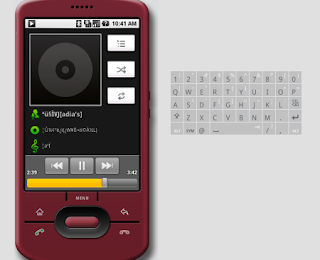
android果然跟平常使用的環境不太一樣啊~~
第一步,讓emualtor掛上一個sdcard image,
先使用android sdk裡的 mksdcard 來產生一個image。
$mksdcard 512M sdcard_for_android.so
$emulator -sdcard ./sdcard_for_android.so
接著就是把media file丟進sdcard space, for example
$adb push beat.ogg /sdcard
此時執行Music, 似乎還看不到丟進去的file...?
adb shell 進去,把 system_server 砍掉,讓它重跑。再進去Music,應可看到丟進去的音樂檔。
$ kill 'PID of system_server'
播放,似乎沒有聲音,重新run emulator,這時加入oss audio backend。
$emulator -sdcard ./sdcard_for_android.so -scale 0.5 -audio oss
執行Music,播放.... enjoy the music for a while....

android果然跟平常使用的環境不太一樣啊~~
訂閱:
文章 (Atom)